Video Voice Editor + Effects
- 4.5
- Rating
- 10.00M
- Installs
- Free
- Price

 Analysis by App-foxy
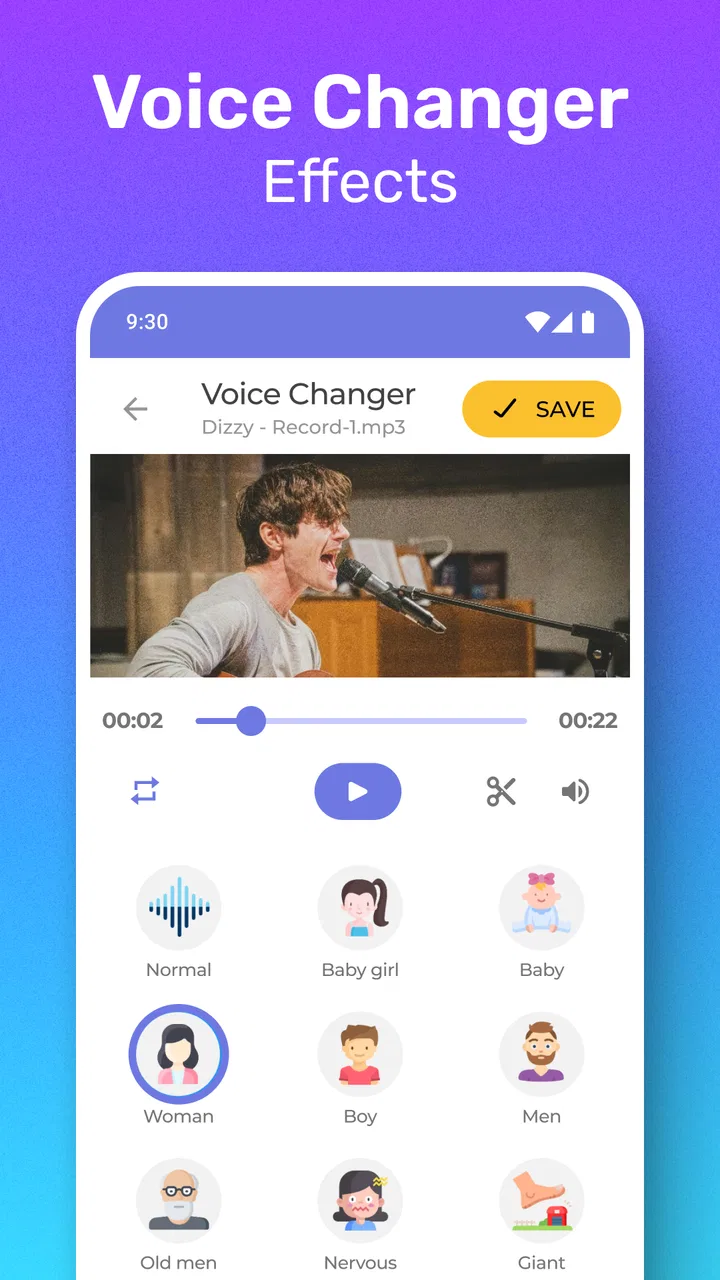
I tried Video Voice Editor + Effects as a quick way to turn ordinary clips into something more playful, and I came away seeing it as a focused creative tool rather than a complete video-editing suite. Its main job is simple: take a video and change the voice with an effect. That narrow purpose is also its appeal. I did not have to learn a large timeline, sort through complicated audio controls, or build an entire production before hearing a result.
For a creator who wants to make a funny message, a short social clip, or a character-style voice for a casual project, that direct approach can save time. The app is free to install, is rated for Everyone, and comes from Firehawk. It sits in the Music & Audio category, although I would think of it more as a lightweight video-creation utility than as a traditional music player or audio library.
My main advice is to treat it as a fast idea-to-clip tool, not as a replacement for a full editor. It works best when the voice transformation is the point of the video. If you need detailed mixing, careful dialogue cleanup, captions, transitions, or a polished publishing workflow, you will probably want another app alongside it.
You May Also Like

 Blood Strike: 2.5 Anniversary
Blood Strike’s Loadouts Turn Every Drop Into a Tactical Gamble
A close look at Blood Strike’s custom loadouts: how fast access to signature weapons reshapes its battle royale rhythm, rewards preparation, and narrows the gap between fights.

 Pandora - Music & Podcasts
Pandora’s Music Is Easy to Start, but Harder to Recover
Pandora’s strength is its low-effort path from a seed to a station. Its weak spot is how much confidence it asks you to place in connection, setup, and quiet recovery.

 8 Ball Pool
 Is Built on Rivalries, Rematches, and Routine
A close look at the rivalries, rematches, shared routines, and unanswered safety questions that turn a quick pool match into a persistent mobile community.

 Samsung Music
’s Quiet Strength Is Playing What You Already Own
Its reach comes less from spectacle than from dependable access to a personal library. That simplicity is both the app’s strongest retention engine and its ceiling.

 AccuWeather: Weather Radar
AccuWeather Review: A Quick, Clear Forecast for Everyday Decisions
For everyday plans, the best forecast is the one you can understand quickly. AccuWeather makes rain timing, radar, and local conditions easy to act on, with a few trade-offs.

 Hill Climb Racing
Why Hill Climb Racing Still Turns Crashes Into One More Run
A tiny car, a bumpy hill and one more upgrade: Hill Climb Racing keeps resurfacing because its simple chaos makes every near-miss feel personal.
More From Our News Desk
View All News


Starting with a voice idea instead of a complicated project
The most useful part of this app is how quickly it encourages experimentation. I can begin with a simple thought such as, “What would this sound like with a completely different character?” That makes it suitable for short creative tests, reaction clips, jokes between friends, and informal social content. The starting point is not a blank professional editing studio; it is a familiar video that needs one noticeable change.
A practical everyday example would be recording a short message for a friend who is celebrating a birthday. Rather than writing a long greeting, I could record a brief video, apply a playful voice treatment, review the result, and share the version that gets the best reaction. The value is in reducing the distance between recording and trying an idea. I do not need to plan an elaborate soundtrack for a thirty-second joke.
It can also help when the original clip feels too ordinary. A standard talking-head recording may not have enough personality for a casual post, while a changed voice gives the clip an immediate creative direction. That does not automatically make the video good, of course. Timing, facial expression, framing, and the clarity of the original recording still matter. The effect works as an accent, not as a substitute for a strong idea.
I found it useful to decide the purpose of the clip before choosing an effect. A comic message, a mock announcement, and a fictional character should not all sound the same. Starting with the intended mood prevents the common mistake of selecting the most extreme option simply because it is noticeable. A less dramatic treatment can sometimes keep the words understandable while still making the video feel different.
Who will get the most from it
The app is a good match for casual creators, families making humorous clips, and people who want a quick voice experiment without studying audio production. It may also suit someone preparing a rough concept for a larger project. I can imagine using it to test whether a character voice fits a scene before spending time on a more elaborate recording.
It is less convincing for musicians, podcasters, filmmakers, or presenters who need precise control over a finished vocal track. Those users usually care about clean editing, repeatable settings, detailed volume work, and a predictable handoff into a broader production. A dedicated audio editor or a full video editor is the better choice when those requirements matter more than speed.
The Everyone age rating makes the app approachable for a broad audience, but that should not be confused with every effect being appropriate for every situation. I would still review a clip before sharing it, especially when children or other people appear in the recording. A voice effect can change how a person sounds, but it does not remove the need to think about consent, context, and where the finished video will go.
Choosing source material carefully
The quality of the starting recording has a bigger impact than I expected. If the speaker is far from the phone, talks over background noise, or rushes through words, the changed voice may become difficult to understand. I get better results by recording in a quiet room, keeping the phone at a steady distance, and speaking with clear pauses. This is a simple step, but it gives the effect more usable material to work with.
I also prefer short source clips when I am testing an idea. A brief section lets me compare several creative directions without losing track of what changed. If I record a long monologue first, it becomes harder to judge whether an effect works throughout the entire piece. Short tests are especially helpful for character voices, where a treatment may sound amusing for one sentence but tiring across a full conversation.
Making, comparing, and refining the result
The making process feels most successful when I approach it as a series of small trials. I start with the original video, apply a voice effect, and listen for three things: whether the words remain clear, whether the voice fits the visual performance, and whether the change supports the intended joke or mood. Those checks are more useful than simply asking whether the result sounds unusual.
One non-obvious trade-off is that a stronger transformation is not always the most entertaining one. Extreme changes can hide pronunciation and make the speaker sound detached from the face on screen. That mismatch may be exactly right for a surreal joke, but it can weaken a message that depends on the audience understanding every word. I usually make one exaggerated version and one more restrained version, then compare them as complete videos rather than judging the audio alone.
Another helpful workflow is to keep the original recording separate from the altered attempt until I am satisfied. The untouched version gives me a reference for volume, pacing, and emotional delivery. It also protects the creative process from becoming a one-way experiment. If the effect makes the clip worse, I can return to the source and try a different direction instead of assuming the first result is final.
For a short social post, I would review the first and last seconds particularly carefully. The opening needs to make sense before the audience understands the joke, while the ending should not feel abruptly cut off. A voice effect can attract attention, but an awkward start or unfinished ending still makes the clip feel rough. The app is most effective when I use it as one part of a small editing routine rather than expecting the effect alone to create structure.
Using effects for character and storytelling
The strongest creative use is not merely making a normal voice sound strange. It is giving a clip a recognizable role. I can record the same short line in a neutral voice, then test how it feels as a fictional narrator, a comic character, or an intentionally artificial announcement. This turns the app into a sketching tool for performance. I am not committing to a final production; I am discovering which direction makes the scene readable and memorable.
For creators working alone, that can be surprisingly practical. I can record a conversation in which one person plays several roles, then use different treatments to separate them. The visual performance still needs to make the roles clear, but the altered voices provide an additional cue. I would keep the dialogue brief and avoid switching effects too often, because constant changes can distract from the story.
A further tip is to match the effect to the rhythm of the speech. A fast, energetic line may become hard to follow after a heavy transformation, while a slower delivery gives the listener more time to recognize the words. If the first attempt sounds muddy, I would try rerecording the line at a calmer pace before abandoning the idea. Sometimes the problem is not the effect; it is the combination of effect and delivery.
Where the simple workflow starts to feel limited
The same simplicity that makes the app approachable can become restrictive during refinement. I would not choose it when a project depends on several audio layers, detailed timing adjustments, background music, or careful synchronization between multiple speakers. Those tasks require a broader workspace, and moving between apps can add friction.
It is also important to distinguish a voice effect from voice repair. Changing the character of a recording does not automatically make a noisy, echo-filled, or badly balanced clip sound professional. If the original audio is weak, I would first improve the recording conditions or use a tool designed for cleanup. Applying a creative treatment to poor source material can make the problems more noticeable rather than hiding them.
There is a financial point worth considering as well. The app is free, but it includes in-app purchases ranging from $0.99 to $99.99 per item. That wide range means I would check what is included before treating the free installation as the complete experience. For occasional jokes, the no-cost starting point may be enough. For someone planning frequent use, it is sensible to understand which creative options require payment and whether that fits the intended workflow.
Reviewing before sharing or handing off
When the voice change is ready, I treat the final review as a separate stage rather than tapping through it casually. I watch the clip with the sound on and ask whether a person who has never seen the original would understand it. This catches a problem that is easy to miss while editing: an effect may sound entertaining in isolation but make the spoken message unclear in context.
I also check the clip without relying on headphones. A result that seems balanced through headphones can feel too quiet or too harsh through a phone speaker. Since many casual videos are watched on mobile devices, this small check gives me a more realistic sense of the handoff. If the app does not provide the detailed finishing controls I need, I would move the result into a more complete editor for final adjustments rather than forcing this tool to do every job.
For a private message, a quick review may be all that is necessary. For a public post, I would be more careful about names, faces, background conversations, and whether the altered voice could confuse the audience about what was actually said. The creative effect should support the presentation, not create an avoidable misunderstanding.
The app’s current version is 1.5.2, and it supports devices running Android 6.0 or later. That makes it relevant to people using older Android hardware, although the experience can still vary with the phone’s camera, microphone, storage, and general performance. I would leave enough free space for the recording and avoid judging the app solely from a very old or heavily burdened device.
How it compares with familiar alternatives
Compared with a standard video editor, Video Voice Editor + Effects is easier to approach when the voice change is the central creative decision. A general editor gives me more control over cuts, titles, music, and transitions, but that flexibility can slow down a simple experiment. If I only want to transform a spoken clip, opening a large editor may feel excessive.
Compared with a dedicated audio workstation, this app is more immediate because it keeps the voice idea connected to video. The trade-off is precision. Audio-focused software is normally better for detailed cleanup, layered sound, and careful finishing. I would choose the dedicated option for a podcast segment or a serious voiceover, while choosing this app for a quick visual joke or character test.
Compared with built-in camera filters, the appeal here is the emphasis on the voice rather than only the appearance of the image. That makes it useful when the performance is already recorded and the creative change needs to happen in the sound. Still, I would not expect it to replace a complete social publishing tool. The best workflow may be to create the altered clip here, then use another app for captions, formatting, scheduling, or final presentation.
My creator verdict
After using it as a working tool, I see Video Voice Editor + Effects as a focused, low-friction way to explore voice-based video ideas. Firehawk has kept the concept approachable, and the app’s popularity is reflected in its 4.5 average from roughly 57 thousand ratings and more than 10 million installs. Those figures suggest it has reached a substantial audience, but my recommendation still depends on what you want to make.
I would install it if I wanted quick character experiments, funny personal clips, or a simple way to give a familiar recording a new personality. The free entry point makes it easy to test, and the Everyone rating keeps it accessible for general use. I would begin with a short, clearly recorded clip, compare a restrained effect with a dramatic one, and judge the result by clarity and purpose rather than novelty alone.
I would skip it as my primary tool for professional delivery, detailed sound design, or projects that need a complete edit from start to finish. In those cases, a full video editor or dedicated audio application will offer better control and a cleaner handoff. The in-app purchase range is another reason to explore the available workflow before relying on it for regular production.
My final impression is positive but specific: this is a useful creative shortcut when the voice transformation is the idea. It helps me move from a rough recording to a shareable experiment quickly, and it encourages iteration without making every decision feel technical. If your goal is to add personality to short videos rather than manage an entire production, this app is worth trying.
FAQs for Video Voice Editor + Effects
01What is Video Voice Editor + Effects and what can I do with it?
Video Voice Editor + Effects is an app designed for editing and enhancing audio in video files. Users can add voiceovers, apply sound effects, and adjust audio levels to create professional-quality audio tracks. It's ideal for content creators looking to improve their video projects without needing extensive technical skills.
02Is Video Voice Editor + Effects free to use, or are there in-app purchases?
While Video Voice Editor + Effects offers a free version with basic features, there are in-app purchases available. These can unlock advanced effects, additional filters, and premium editing tools that enhance the overall user experience. Prices vary depending on the features you choose to purchase.
03What file formats does Video Voice Editor + Effects support?
The app supports a wide range of audio and video file formats, including MP4, MOV, AVI for video, and MP3, WAV for audio. This flexibility allows users to work with most common file types without needing to convert them beforehand, streamlining the editing process.
04Is Video Voice Editor + Effects user-friendly for beginners?
Yes, Video Voice Editor + Effects is designed with a user-friendly interface that's suitable for beginners. It provides intuitive controls and straightforward navigation, allowing users to easily apply effects and make edits. The app also includes tutorials and tips to help new users get started quickly.
05Does Video Voice Editor + Effects require an internet connection to function?
The app primarily works offline, allowing users to edit and save projects without needing an internet connection. However, some features, such as downloading additional effects or accessing cloud storage, may require connectivity. Users can perform most editing tasks without being online.
Pros
- Intuitive interface for easy navigation.
- Wide range of audio effects available.
- Supports multiple video formats.
- Quick export without quality loss.
- Regular updates with new features.
Cons
- Limited free version functionality.
- Occasional ads in free version.
- High-quality exports can be slow.
- Some effects require in-app purchases.
- No cloud sync for projects.

Video Voice Editor + Effects
Gallery